why do i code?
18 july 2026
read me!
this is me on 16-18 july 2026 talking. i have no idea when it'll become glaringly obvious to me that whatever i'm about to write (it hasn't been written yet) is undoubtedly the most cringe thing i've ever written. but i feel like i have some ideas, so i'll put them down on the page anyways. isn't that the best any of us can do at any given moment?
also, all this i'm writing is colored by my present ideas about my past. i am my own unreliable narrator.
the easy answer, or the answer i told myself years ago
i code to get employed.
i was a very clueless person when i first started programming for real. the pandemic had just begun, and the already disorienting situation was compounded by my lack of experience as a human being. perhaps it's obvious that i, being a fat adolescent boy who did not have the first idea about what they'd do in the future, would pretend to be completely sure of myself. i told myself and anyone else who inevitably asked that the only future i had even considered was a well-paying job that could sustain me for forty years.
ignoring the fact that this is already a super lucky outcome by all means, it sounds pretty boring. i think i thought so at the time too, but i was being ironic. still, everyone has to pay a mortgage, right? and maybe it wasn't my fault that i ended up making up an answer. no one really knows what they want to do with the rest of their life when they're twelve years old.
"...and then i'll die"
i remember giving this speech to my parents, my friends, my relatives, and whoever asked me why i code.
"i'm learning to code now, so that when i grow up, i can get a job at microsoft or some other Large Corporation, where i'll work a modest-to-high-paying job for forty years and then die."
doesn't that sound a little boring? they'd say? maybe there's something better out there for you. something more fulfiling.
i guess i just didn't believe any of them. there wasn't anything else i could see myself doing in my future. hell, there wasn't anything i saw in my future. at that point in time, i didn't even consider my future as a thing that i had to consider. it was just so far away, and it felt like time was crawling along. i thought that after the pandemic ended, i'd be able to compress all the memories and experiences of that time into a little self-contained point in time. it felt like that too; for years it felt like last year was sixth grade, even up until i was entering tenth grade.
anyways, that was how it was for a good long while. i plopped myself down in front of my computer every day, often for hours on end, typing away, making a virtual world to augment, or maybe supplant, the world i actually inhabited.
still, i felt a spark, an affinity, for programming, that i just never did for anything else. i had this space, which despite not taking up any physical room, felt more vast and full of possibilities than any space i'd ever encountered "in the real world."
first steps
i did a lot of minecraft modding. it's actually what got me into programming, and, in hindsight, i owe pretty much my entire life trajectory to this time period. so i guess, despite my cynicism, everything did work out in the end.
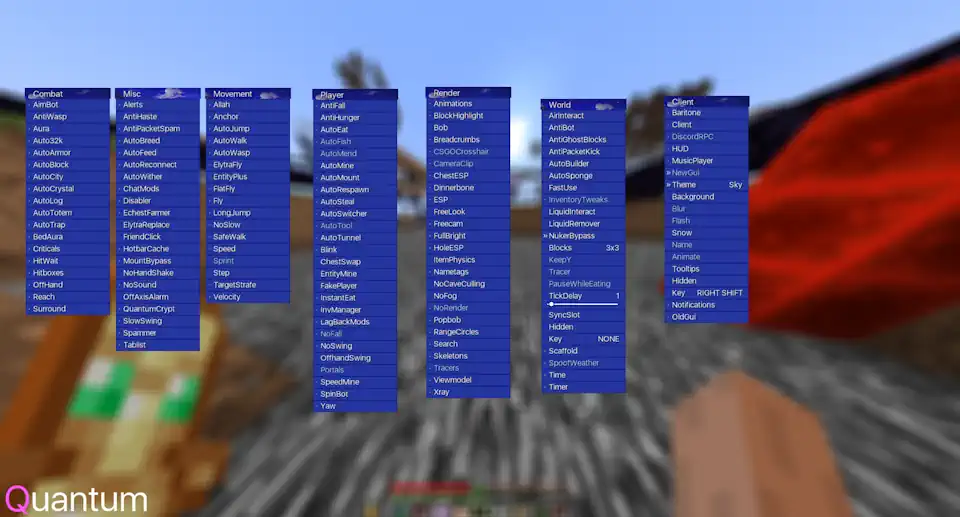
above: the minecraft utility mod i made with some friends. we used it to dig our way from the center of the world all the way to the +X and +Z world borders (that's 7.5 million blocks in the nether!)
i also began exploring what i could do in my own standalone programs. here are some first experiments i made with opengl.
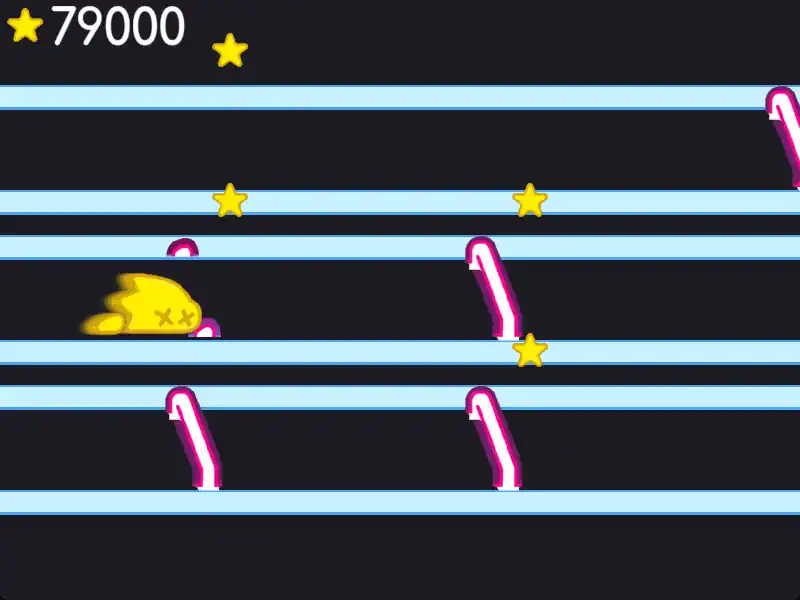
above: a clone of a game we used to be able to play on breaks during this standardized exam we took called the "i-ready"
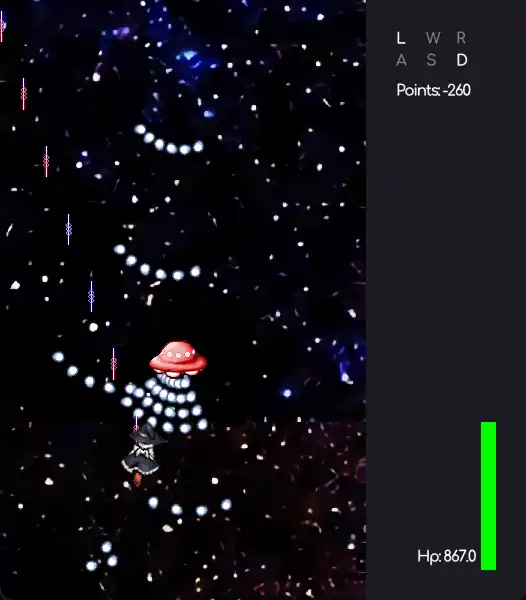
above: my take on touhou made for my friend david
it's a lot of me just doing whatever. in the first case, it was literally boring — boring a hole, that is — and in the second, it was me just trying to learn some stuff and be cool while doing it. wholesome stuff.
so, the pandemic came and went. i entered with no idea what i wanted to do do with my life and why i did anything with the time that i had, and i exited not knowing any better. but i did at least find that spark, that affinity.
what felt like the final answer
my family friends, brother, and i sank a ton of time into this old adobe flash game called "realm of the mad god" when we were younger. i fond memories of playing late into the night at new-years' parties.
i got hooked on a spinoff of the game called "revenge of the fallen". unfortunately, it threatened the original so much that the company that ran it filed a dmca takedown request. the developers of my favorite spinoff had no choice but to comply.
i had a whole youtube channel dedicated to me recording myself getting rare loot in the game, and i was pretty heavily invested in that, too! i will NOT be putting that here, though.
they promised a remake sometime in the futureTM, but it never came. it still hasn't, seven years later, and they've stopped development.
i know how to code, and i know what i want to make. i'll make it.
this is honestly one of the most bittersweet phases of my programming career. with nothing else that i wanted to do and mounting pressure to do more, more, MORE! from my parents and gestures broadly, i started remaking revenge of the fallen with the tools i knew at the time.
i felt so much like i had a goal. that's a sentence. but i did! i felt like i had a goal, and i spent nearly every day of mid-2021 to mid-2022 working on the thing, which i dubbed "realm of the sad god". to date, it is my longest-held project.
of course i called it sad. looking at the project now, i think it's incredible that 14-year-old me put so much care and attention into every single detail of this project, but adding self-deprecation to an extreme extent always makes me feel comfortable.
if i call it sad, then it doesn't matter if other people think it's sad or sloppy, it's all clearly just a joke!
realm of the sad god isn't sad, though. i'm so proud of the work i put into it now. there's multiplayer, texture splatting, and shader-based transitions. it feels polished. it really is beautiful, looking back.
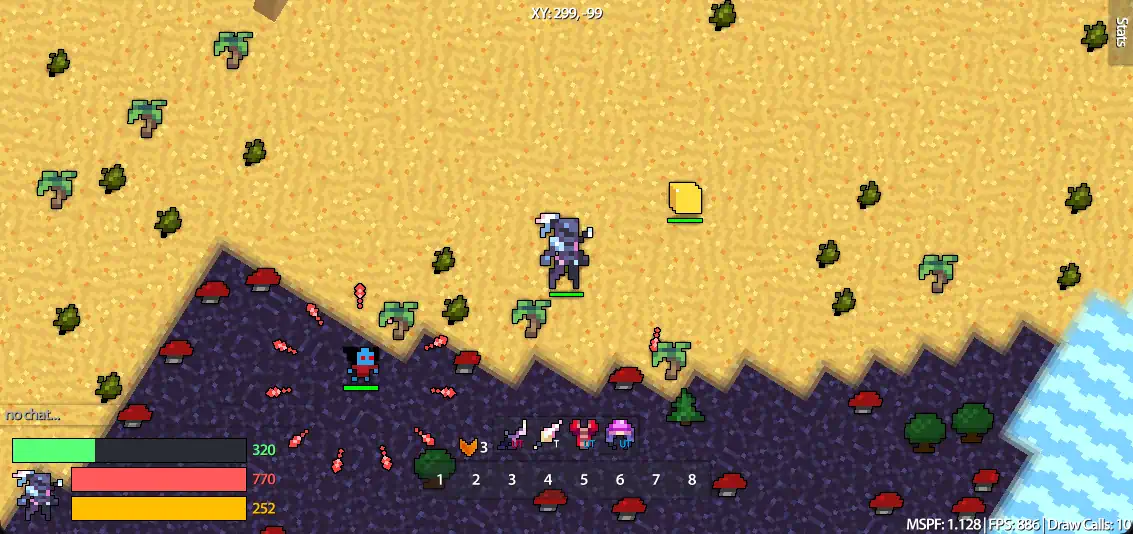
above: a still of realm of the sad god. i still can't believe i made this in freaking eighth grade!
trudging along
my problem with long-held projects, especially in code (unfortunately), is that i get bored way too easily. or the technical debt piles up and i'm too lazy to clean it up. or i begin spending too much time playing the game, using the product, or mindlessly looking at the result to actually work on it.
really, it's a combination of everything, and mounting pressure from my own self to keep working at the project despite my loss of interest. i've created this pattern that ends in me never finishing anything, because the pressure to finish the thing begets that very thing's demise. it just makes everything feel pointless. like, i've made this codebase, what i like to think of as a work of art (i know it's not, but i can pretend that it is), for my own benefit and for my own fun, and yet it feels like a burden upon me. how can such a fun thing feel like a burden?
it's like going out sometimes. there's so much pressure to have a good time, especially when i'm going out with friends that i haven't seen in a while or am seeing in a new context for the first time, that i just hole myself up in my head. there's shells upon shells of reasons to be afraid of taking the next step, and so i just don't. i just give up. i stop typing, or i just dissociate until the night is over.
i haven't been able to get past this trudging along feeling since this project. i miss having a piece of code that i know inside and out and that i've polished for months. i miss especially working on these projects with friends. being fulfilled is so much work. hell, i'm doing it right now. i feel like i'm failing because i'm just rambling on. and then i feel like i'm failing further because i feel like i should be should be feeling fulfilled but i still feel like i'm failing. terrific! and terrible.
little things
after realm of the sad god, i began a series of projects, each of which i thought would turn out great, but would ultimately meet the same demise, and in the same way, too.
i have a goal that requires some technique i don't yet know (order-independent transparency, physics simulation, heavy post-processing, skeletal animation, you name it).
i work hard to learn this technique, and i implement it.
then, my motivation to finish this project and meet this self-imposed goal falls off a cliff. i don't know why. it's weird. i guess school kind of trained me to do this?
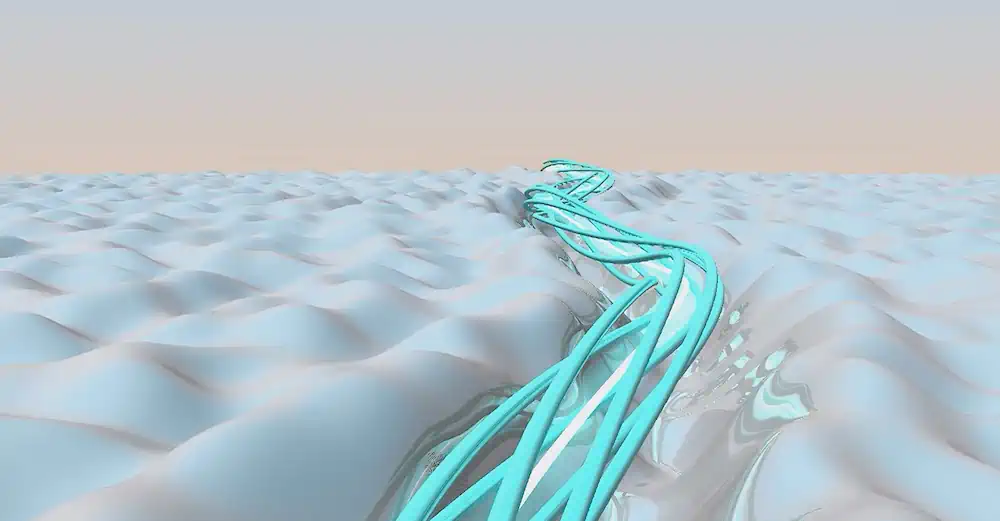
above: a ray-casting shader i wrote for fun after i started connecting derivatives with stuff i could do in computer graphics
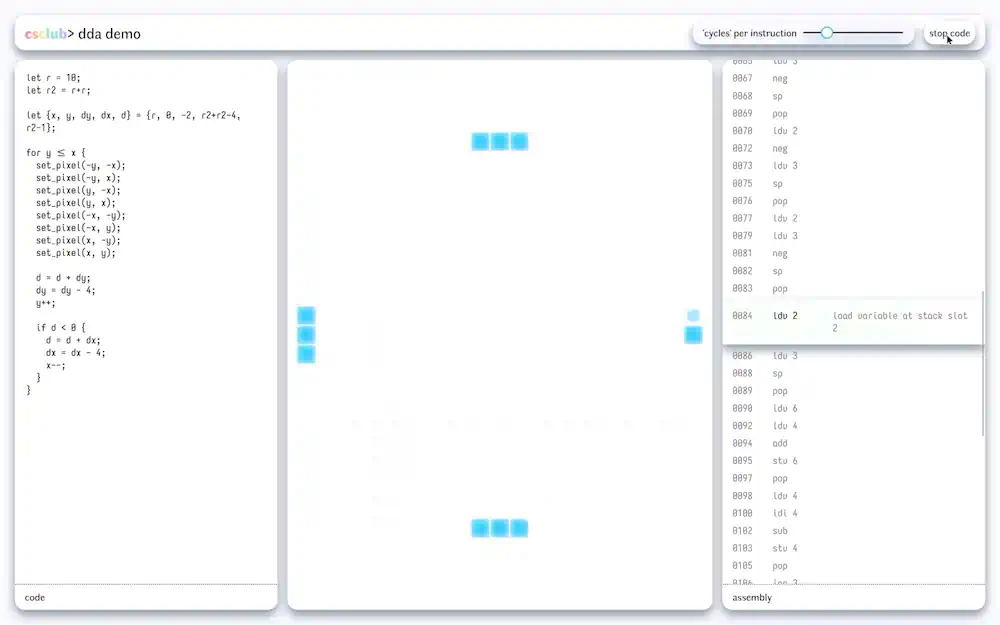
above: a demo site i built to showcase how the dda (differential digital analyzer) algorithm can make repeated computations faster
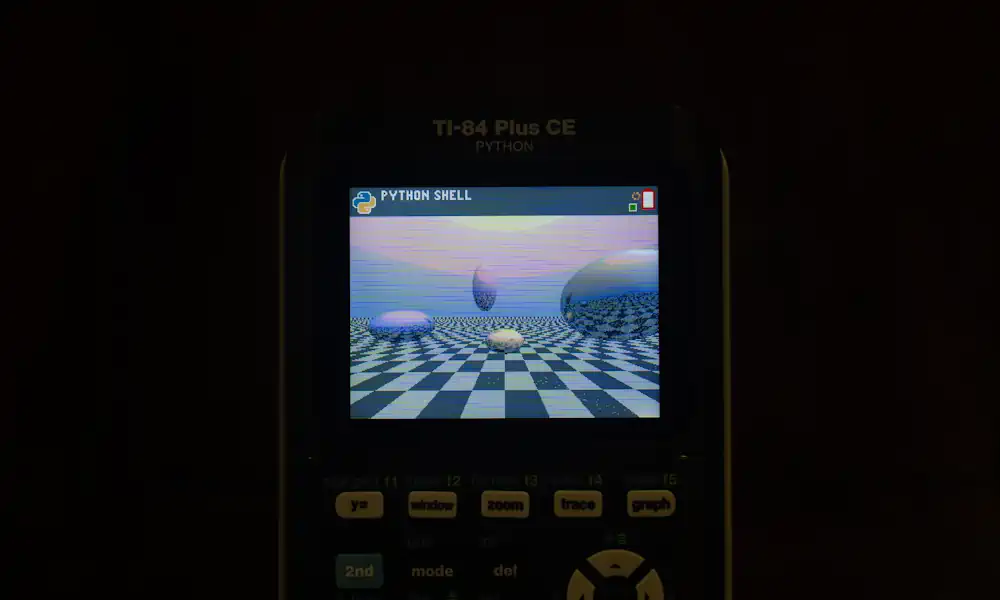
above: a raytracer written in python by hand on my friend's ti-84 calculator
above: video; a skeletal animation engine i made (literally each bone is a line). i later found out that the feet sliding was caused by setting the position of the knee steady at each time step, rather than the foot. my bad.
above: video; a graphical basic interpreter i wrote to demo basic to the cs club
above: video; a tennis for two game
above: video; a 3-d version of that i-ready game clone i made
above: video; a little hot air balloon thing where you can fly around with some nice dithering and a beautiful color palette that i still use
me! me! me!
i like to think that my ego is in check, and i have for a while. looking back, that's clearly not the case. frankly, the fact that i still think that it's somewhat the case is cause for a rethink, now that i'm typing this.
there was this idea i had, motivated largely by the polarizing character that is jonathan blow, that i must use the lowest-level language possible for any given task. if i'm writing a browser-based graphics-heavy app, it must be in c and webassembly, no matter how ill-suited its ecosystem is. hell, everything must be in c. that was actually my mentality for a while, and i still honestly can't put that urge past me to use c for everything, even though i know it'll make me want to bash my head into a wall.
the feeling that i'm saving the world by programming in c for everything and preserving the knowledge of low-level programming is pretty enticing, but there's no way in hell that taking things this far could possibly be the best solution. i wish i hadn't fallen into that rabbit hole; there are a few projects (some on this blog!) that have ended prematurely due to how un-expressive c is combined with the whole trudging along feeling i described above.
i made things difficult for myself, because i feel like that somehow makes me better. it doesn't, but it felt like it.
and now?
i've had a pretty rough couple of years. correction. i've had a pretty rough adolescence. not in the sense that i've had familial instability or a lack of food or shelter or anything like that, which i'm grateful for. but in the sense that i've just had a pretty rough adolescence.
my thinking has almost come full circle to part of the mentality i had during the pandemic. i guess i code just to escape. that's why i kept on making those little programs throughout high school, never "finishing" a single one.
the goal was never the program itself, but instead to just be in the otherworldly place that is my computer. when i'm programming, i feel absolutely no responsiblity to explain myself to anyone who asks what i'm doing. they just think i'm dialed in, i just want them to go away. we, well i at least, communicate effectively despite the discrepancy in thought. they leave me alone. congratulations michael.
reality check.
ok wait, that seems like not nuanced enough of an answer. let's add something else to it.
i love my computer?
i haven't yet discussed just how much i love programming. i love typing, i love thinking, i love imagining the electrons whizzing around inside my computer at my command. when i am programming, i am in my computer. i am in it. i finally feel present.
it's the only time my thoughts fall away. i stop worrying about whether i'm good enough or not. i stop thinking about whether i should leave this earth early or not. my physical body and the distress i feel with it is no longer a concern, because i'm not in it anymore, i'm in my computer. it turns out that that feels better than constantly worrying anyways.
i lose track of time. i feel my fingers dancing about on the keyboard so effortlessly, so naturally. i run my program and am reminded that the result is actually one on which humans have collaborated for millenia. i think about how many late nights people around the world have spent working together so that i am able to do what i love doing.
and my faith in humanity begins to heal once more.
that's the end of this post. thanks for reading!
back to top ⤴
c preprocessor for html
19 may 2025
so, i lost the source code to my blog a couple weeks ago, and i think this is the opportunity to migrate all my content to a static site.
i won't lie, i have no idea how web frameworks work, and unfortunately i don't want to learn them at this point since i'm busy with other things. i just want to get this blog out the door, but at the same time i want my experience writing posts to be ergonomic.
cpp as a templating tool
gcc (the c compiler) provides an executable called
one thing to keep in mind, though, is that
further, the preprocessor turns unicode characters into the format used for c programs:
other than that, the only issue is preserving whitespace, so i added special case escapes that get
speeding up iteration times
while i disagree with how react encourages the use of unnecessary js, i concede that iteration times are significantly decreased with its templating capabilities and hot-reloading support.
since i'm making a static page here, i don't care so much about the hot-reloading, but i do want templates and fast rebuilds.
luckily, the c preprocessor is heavily optimized, and that means that running it over all the html source files is fast. a simple batch script runs both
is this something really useful?
i think so! it took only a couple hours to get everything set up, and the blogging experience is actually pretty okay. plus, i don't have to deal with opening and closing html tags, because i get macros, and i get the flexibility of html, since everything is still an html file! this really is the best of both worlds. i'm waiting for the footgun moment to happen though
that's the end of this post. thanks for reading!
back to top ⤴
shadertoy 1: truchet
18 may 2025
wow, it's been more than a year since my last blog post. i suppose that's fitting, though, since this year's been a doozy.
well, i have some more time now, and i've got so much energy to try some new stuff. i've been inspired especially by some graphics programming demos that were posted in our cs club's show-and-tell channel, as well as the revision demoparty's shader showdown. i still remember the first time i saw live shader coding; i was genuinely amazed at how much they were able to pull off in just 25 minutes, as well as the level of polish they were able to deliver.
revision 2025 just happened, and shader showdown was once again pretty awesome. while the main event was the addition of compute shaders, one part of flopine's submission really caught my eye.
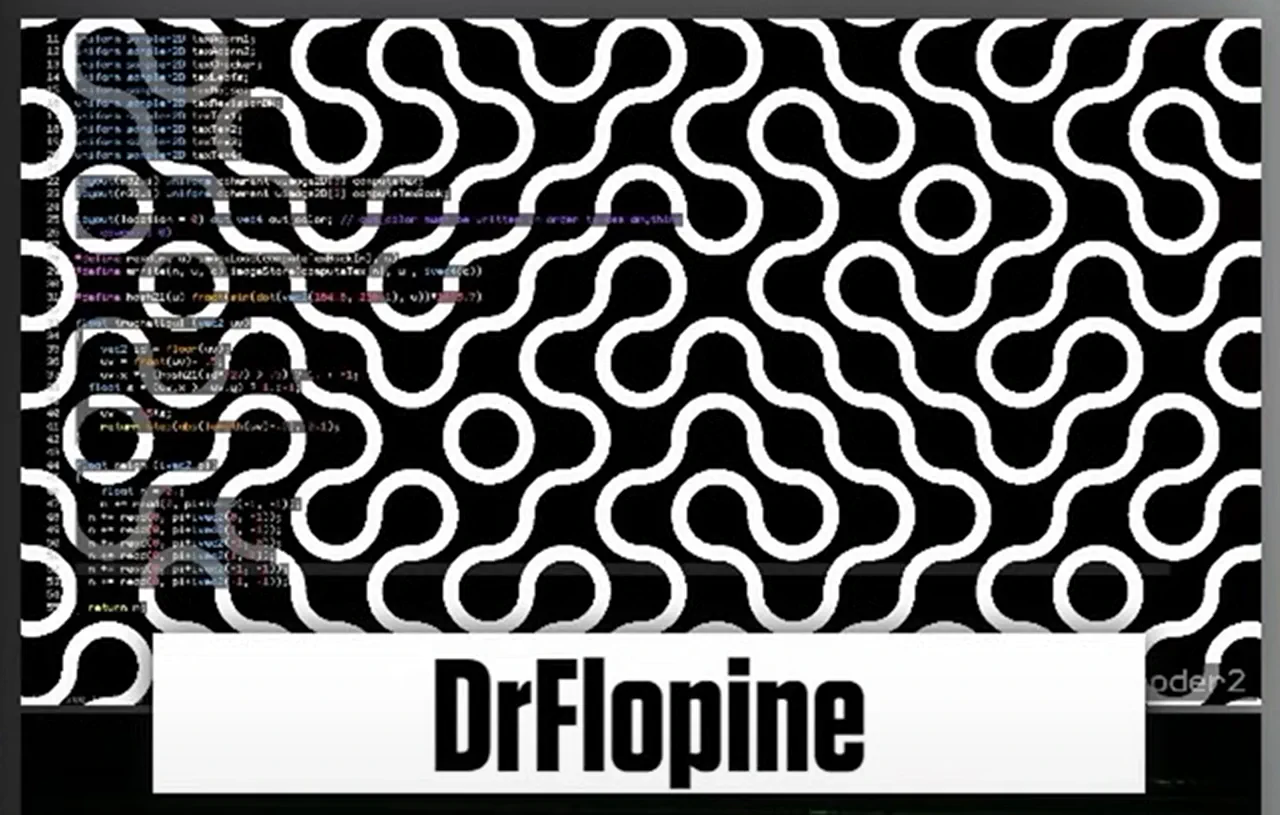
it's such an elegant pattern, and i wanted to go through my own process of making it in the most optimized way. in the end, i learned things i never knew about GLSL and discovered the really welcoming community on shadertoy.
my first attempt
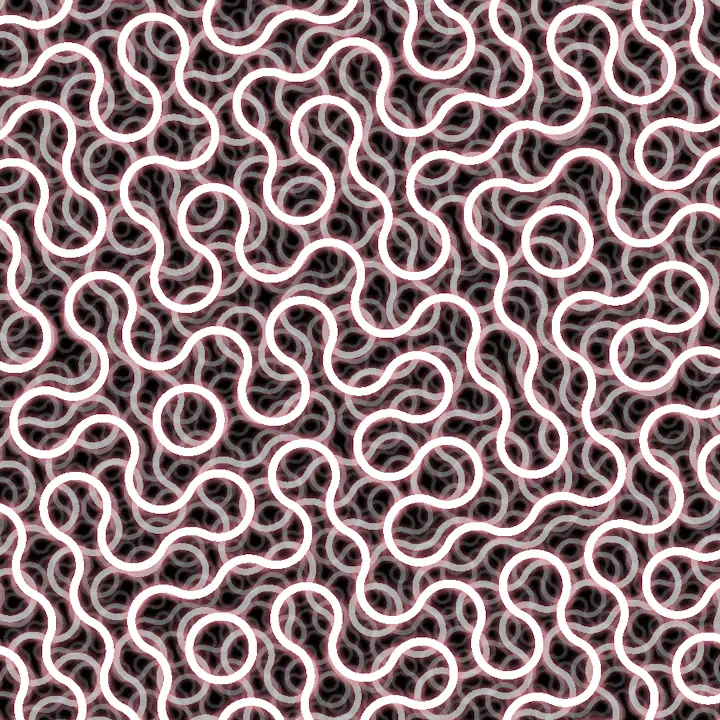
the general idea is as follows:
- for each pixel, find which cell it's in; each cell is
w wide. - find the hash at the bottom left of the cell mod 4.
- index into an array that decides the two points about which we're making circles
- draw the circles with some nice glow
- repeat this for different scales with some nice blending!
truchet(vec2 p, float r, float w)
{
float hr = r / 2.;
float hw = w / 2.;
vec2 b = floor(p / r) * r;
vec2 c = b + vec2(hr);
uint h = hash(uvec2(abs(c * 100.))) % 4u;
vec2 a[] = vec2[](
b + vec2(r, 0),
b + vec2(r),
b + vec2(0, r),
b,
b + vec2(0, r),
b,
b + vec2(r, 0),
b + vec2(r)
);
float d = distance(p, a[h]);
if (abs(d - hr) < hw) {
return vec4(1.);
}
if (abs(d - hr) < w * 1.5) {
return vec4(color(itime * 0.5), (1. - (abs(d - hr) - hw) / w) * 0.5);
}
d = distance(p, a[h + 4u]);
if (abs(d - hr) < hw) {
return vec4(1.);
}
if (abs(d - hr) < w * 1.5) {
return vec4(color(itime * 0.5), (1. - (abs(d - hr) - hw) / w) * 0.5);
}
return vec4(0.);
}
the issue here, as fabriceneyret2 pointed out in their comment, is that arrays are slow in GLSL, and that i'm not doing any antialiasing (which i can get for free!). surely, i could find a new way to fix these issues.
my second go
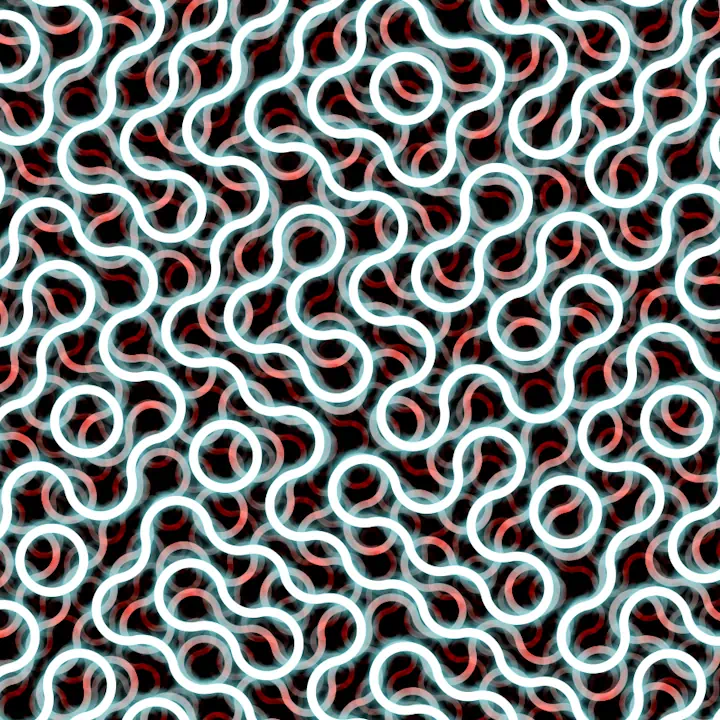
now we're talking. let's take a look at what's different now!
truchet(vec2 p, float r, float w)
{
float hr = r / 2.;
float hw = w / 2.;
vec2 b = floor(p / r) * r;
vec2 c = b + vec2(hr);
float h = float(hash(uvec2(abs(c * 100.))) % 4u);
float i = 3. - h;
vec2 a0 = b + vec2(mod(h, 2.) * r, floor(h / 2.) * r);
vec2 a1 = b + vec2(mod(i, 2.) * r, floor(i / 2.) * r);
float d1 = distance(p, a0);
float d2 = distance(p, a1);
float d = min(d1, d2);
vec4 glow = vec4(
color(triangle(itime * 0.125, 3., 1.)),
(1. - (abs(d - hr) - hw) / w) * 0.5
);
return mix(vec4(1.), glow, smoothstep(hw, hw + 1.414, abs(d - hr)));
}
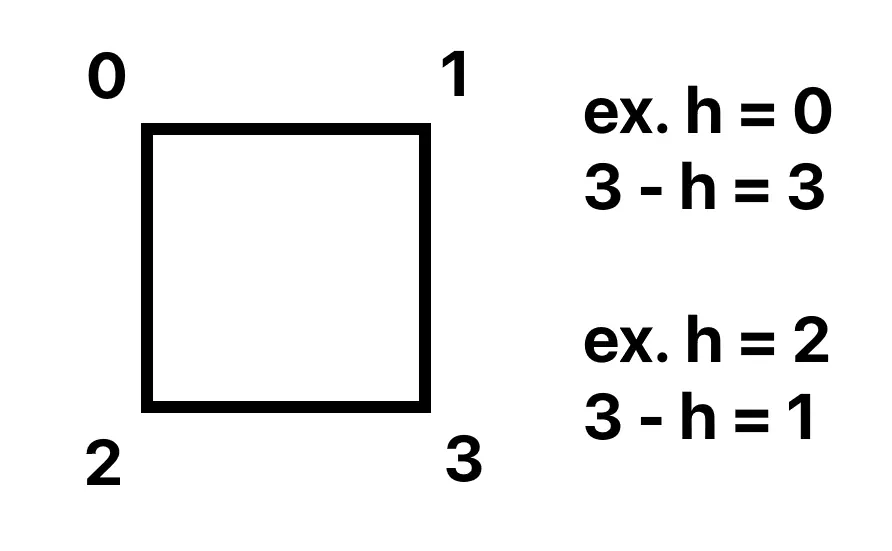
alright, so i got rid of the array! instead, we have some math. the idea is that we pick a hash the same way as above, but instead of indexing into an array, we treat that hash as one of the four corners of our cell! then, once we pick one corner of our cell, we can pick the diagonally opposing corner using
final product
check out the full shader on shadertoy!
that's the end of this post. thanks for reading!
back to top ⤴
a 3d renderer in 2d desmos
11 may 2024
update 18/5/2025
this graph is featured in the 2024 desmos art expo! check it out on desmos's art page.
this project started seven months ago, when my precalc teacher told us about his brilliant assignment: make an artistic graph in the desmos graphing calculator. i knew i wanted to make something in 3d, but i didn't get it working in time, so i ended up making this monstrosity.
about a month ago, he had us make another graph, and i knew i wanted to one-up myself. i thought back to that 3d renderer i tried to implement but failed to get working, and tried to fix it up!
in this graph you can see my first attempt at a perspective projection in desmos.
getting over desmos' quirks
to get to this point, i had to jump over so many hurdles. for one, desmos doesn't support lists of lists, which makes doing any operation that requires multiple positions clumsy. the best way i've come up with to mitigate this is to store one list for each component of the calculation.
the lack of lists of lists also makes representing matrices annoying. i settled on flattening out the list and using the formula
the issue with my first attempt
well, as it turns out, through all my years of graphics programming up to that point, i had never actually learned how the perspective matrix worked! the whole thing was a really humbling experience for me and it got me to read up more on the math, hidden behind wrappers, that i've been using so often.
the missing step was the divide by w, which is integral to getting the perspective distortion that brings objects closer to the center of the screen the farther they are away. the w value is set to the actual z value, whereas the z value is mapped from the interval [near, far] to [0, 1], which is why my previous attempt that divided by z didn't look correct.
loading 3d models
the next hurdle was getting 3d models from blender into the graphing calculator. for this, i used a separate program in c that used assimp to parse files and spit out various lists ready to copy and paste into desmos.
alright, i've got the data now. time to render it! because i used the vertex/index buffer format that opengl uses, it was simple to get all the polygons rendered like so.
f_transform(
M_world2ndc,
x_vbo[i_vtx0],
y_vbo[i_vtx0],
z_vbo[i_vtx0]
),
f_transform(
M_world2ndc,
x_vbo[i_vtx1],
y_vbo[i_vtx1],
z_vbo[i_vtx1]
),
f_transform(
M_world2ndc,
x_vbo[i_vtx2],
y_vbo[i_vtx2],
z_vbo[i_vtx2]
)
)
great! we've got a working renderer now.
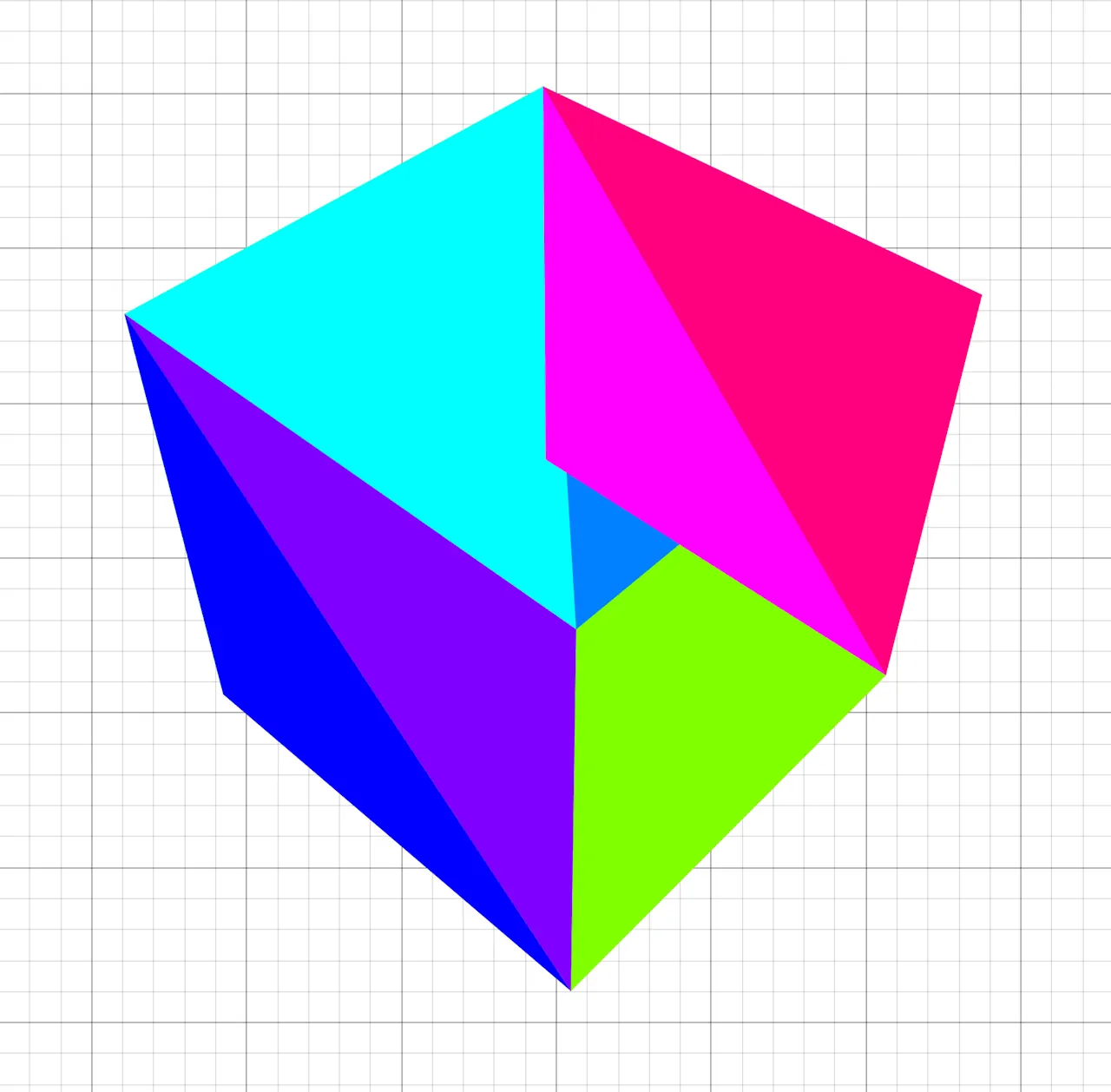
oh.
implementing depth sorting
well, it's time to implement depth sorting! i'll describe my (slow) first attempt in detail here, and later on i'll go over optimizations. the main idea is this: if we draw the triangles in order from front to back, then the triangles in the back will be occluded by the triangles in front, like they're supposed to!
in order to implement this, i used the centroid of the triangle as its position and projected each of them to use its z position in ndc as its depth.
(x_vbo[i_idx0] + x_vbo[i_idx1] + x_vbo[i_idx2]) / 3
t_centroidY =
(y_vbo[i_idx0] + y_vbo[i_idx1] + y_vbo[i_idx2]) / 3
t_centroidZ =
(z_vbo[i_idx0] + z_vbo[i_idx1] + z_vbo[i_idx2]) / 3
t_depths = -f_z3(T, t_centroidX, t_centroidY, t_centroidZ)
here's where my first implementation gets a bit dumb. i had to sort the indices for each triangle, but keep the indices together.
so i did the most straightforward thing!
[t_depths[floor(i / 3) + 1] for i in 0..t_depths.length / 3]
i_sorted = sort(i_ibo, t_keys)
that actually works, but it's slow because it allocates so many lists and sorts 3x the data it needs to. oh well, let's implement lighting now and optimize later!
phong shading
to really cap it all off, i added the phong shading model to the renderer, which is a fast approximation for proper lighting that really sells the 3d effect.
max(
f_dot3v(
t_viewDirX / t_viewDirNorm,
t_viewDirY / t_viewDirNorm,
t_viewDirZ / t_viewDirNorm,
l[1] - 2 * x_norm * t_dotNormIncident,
l[2] - 2 * y_norm * t_dotNormIncident,
l[3] - 2 * z_norm * t_dotNormIncident
),
0
) ^ 32
t_l =
sort(
0.1 + max(
x_norm * -l[1] + y_norm * -l[2] + z_norm * -l[3],
0
) + t_spec * 0.3,
t_depths
)
the final result
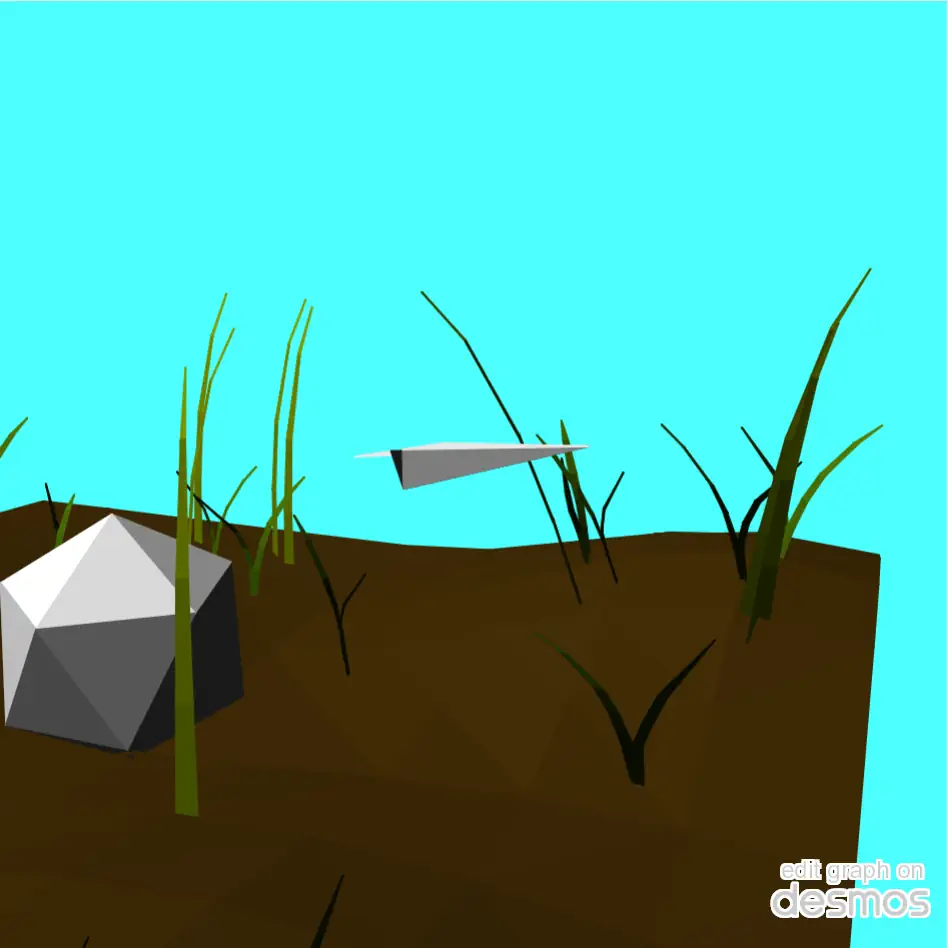
that's the end of this post. thanks for reading!
back to top ⤴
wip: my custom game engine
5 may 2024
a short note:
you might think i haven't given this engine a name yet. but you'd be wrong! the name is wip, and that's for good reason. i've started projects many times because i came up with a cool name for them. but as soon as i start a project like that, the project's doomed, because i'm hyped for the cool name, not for what the project actually is. when the novelty of the name wears off, so does my motivation to finish the project, and by giving it a dumb name like work in progress, i think i'm finally excited about the project for the project, and not for the name.
which language?
i'll start with the language i chose for this project, because i'm 1) really enjoying it and 2) kind of unconventional for these types of things.
i'm using c. why c? before this project, i programmed mainly in c++, and before that, i used managed languages like java and c#. though i enjoyed programming in those languages at the time, i realized that i was prone to writing unnecessarily complex code when given the resources to do so.
for example, i'd use huge amounts of C++ templating, even though i wasn't going to be releasing the engine to the public or anything, so that bit shouldn't've even been there in the first place. or i'd develop some hugely complex state management system, which only served to muddle the waters between me and the finished feature.
in the languages i used to use, it was like the language features served to push me in the direction of unnecessary complexity, whereas in C, i feel like complexity is something i have to actively seek out (which i'm trying my best not to do).
before i get farther into bikeshedding territory, let's move on to the parts of the engine i'm really proud of!
the physics engine
i'm super proud of this. the biggest hurdle for me is always getting some sort of collision detection in place, and the daunting task has killed many a short project of mine. though the engine is currently not physically based in any way, it does work to keep the player above ground and outside of trees. i've had to optimize it to get it working at real time, but it's nowhere near being fully efficient.
i wanted it to support three different shapes: triangle meshes, capsules, and spheres. it was relatively easy to pull code to handle collisions between triangles and spheres, and because capsules are like a special case of spheres, it was relatively easy to adapt the code to work with them, too.
great. i now have a working physics engine, right? no.
sure, the collisions worked, but that's a moot point when the game now runs at five frames per second, so it's time to optimize. in the engine's current state, the world is partitioned into regions that are the same size as a chunk. next, each of the physics objects in view are placed in the regions that their bounding boxes intersect with, which is the first step to reducing expensive compares when doing collision resolution. next, objects are checked in pairs in each region, but pairs are skipped when their bounding boxes don't intersect, which further increases performance.
there's still things to improve and learn, though. i still have absolutely no idea what a bvh tree is, or how it can improve performance, and after watching mike acton's talk on data oriented design, i realized my design is inherently bad for cache coherency.
the renderer
the renderer includes stuff i've learned previously, such as chunking, instanced rendering, and dithering, but also includes lots of new optimizations i had to figure out in order for it to get running well.
at first, i made the simplest thing that worked: no culling, one draw call per object, and huge amounts of wasted opengl calls. to no one's surprise, the renderer struggled to reach 60 frames per second even in simple scenes, such as a flat landscape with some spheres scattered around it.
it was fine for the time being, but as i added dynamic shadows, high-poly trees, and more detailed terrain, the program started to chug. i saw the milliseconds per frame slowly climb as i added features, first from 18 to 25 when i added shadows, and then to nearly 120 when i added in my precious trees.
now, old me would have probably given up here, but hey, this project is a work in progress. there's always room for improvement. first, i changed the renderer to use instanced rendering. i thought there would be a huge improvement in frame times, but there really wasn't. i kept the development, though, because one draw call seemed better than many. i almost gave up here because i thought i didn't know how to speed it up in any way.
frustum culling (120 -> 40 ms per frame)
okay, so instanced rendering didn't help me out. but what if i just found ways to draw less stuff? first, i tried a naive solution to frustum culling. using
alright, so blindly comparing the relative angle doesn't really work. however, i found a new naive solution: simply project each of the corners of the object's bounding box, and then see whether it gets culled. if any of the corners aren't culled, then the object is in view! this worked a lot better than the last solution because it was actually rooted in some sort of reasoning, but it missed some cases such as when the bounding box was partially in view but whose vertices are all clipped.
as always, it's learnopengl to the rescue. there's a great article on it about frustum culling, and after implementing the solution found on the website, i was able to get analytical frustum culling in place, which made the artifacts go away. however, some trees that are out of view still cast shadows that end up in view, so the shadow pass uses a frustum that starts farther back from the eye of the player, thus increasing the number of trees it renders on the sides of the frustum.
levels of detail (40 -> 25 ms per frame)
okay, so i'm drawing less trees now. however, after some inspection, i found that i was still trying to draw fifteen million triangles a frame! to further reduce the amount of triangles drawn, i decided to implement levels of detail for my trees.
the first step is to make new, less detailed models for trees that are far away. the goal here is to decrease the amount of triangles drawn for trees that are far away, because the player won't even be able to see the extra detail. i created new, lower poly models for each tree, which i render in place of the full detail model when the trees are more than forty-five units away.
here's a comparison between the draw calls i was making before and the draw calls i'm making now. the call for 201000 vertices is for a small bush, by the way.
without LOD:

with LOD:

one last thing... (25 -> 11 ms per frame)
after the previous two optimizations, i really thought i had nowhere left to go, and thought i'd just have to start getting rid of leaves.
but one day, i was scrolling in the opentk discord server, and i saw this conversation:
BoyBaykiller: Are you on an intel gpu?
caps lock: nvidia
caps lock: rtx 2060
BoyBaykiller: ok, I know this seems stupid but can you make sure its actually using that with Console.WriteLine(GL.GetString(StringName.Renderer));
that prompted me to check whether opengl was actually rendering on my RX 6500m, because my laptop also has integrated graphics in it.
it, uh, wasn't.
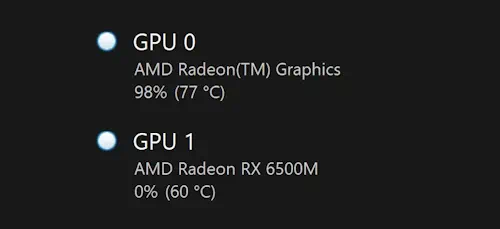
to fix this, i added two lines of code that force AMD and nvidia drivers to use their proper gpus.
__attribute__((dllexport)) DWORD NvOptimusEnablement = 0x00000001;
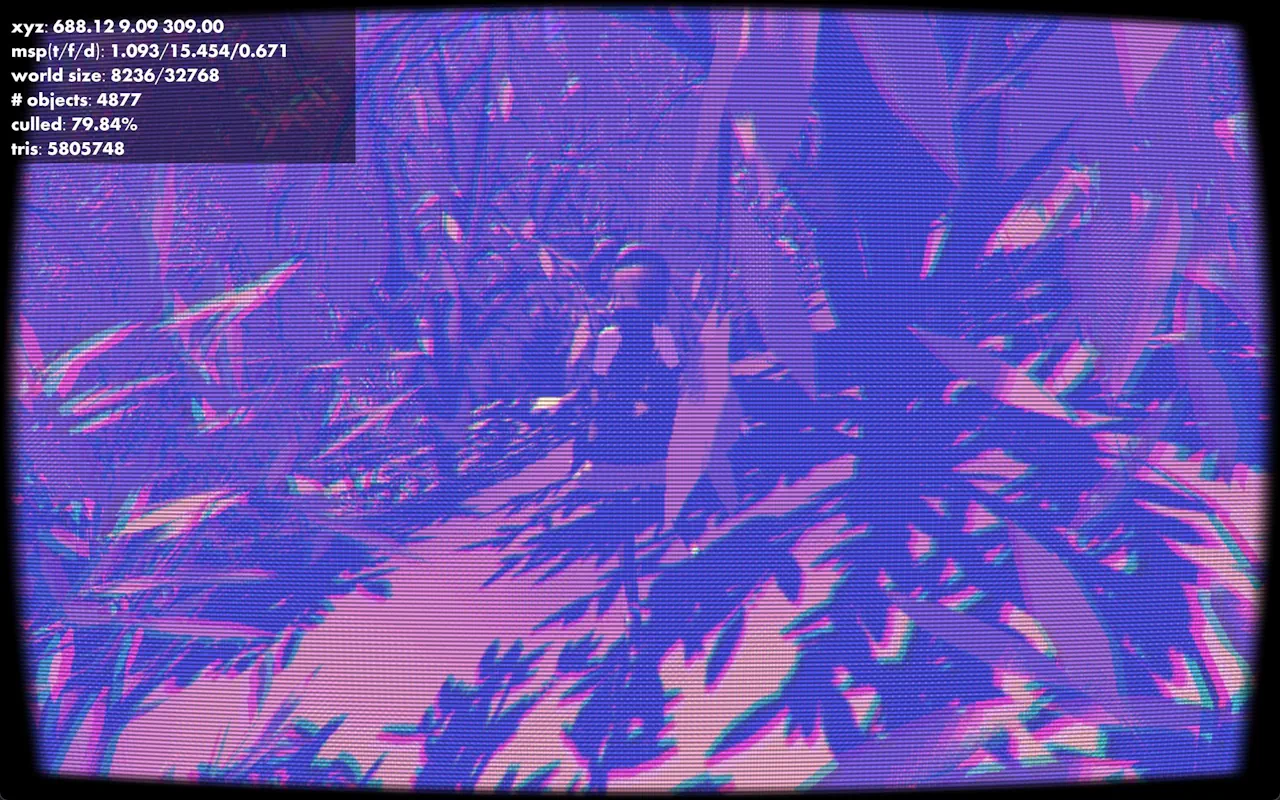
the final result
that's the end of this post. thanks for reading!
back to top ⤴
tōsuto: a scripting language
21 april 2024
i've recently been wanting to get back into making programming languages again, so i've started up this project to fulfill that desire. though i didn't have a goal for what the project would be, i knew that i wanted it to have a really minimal syntax that, given it was my first language, made at least some sense with good amounts of continuity.
i started off by playing around in my code editor and seeing what looked okay. inspired by jai and odin, i made my function declaration syntax super simple, with just a single colon between the name and the arguments and body. to make the language more concise, i made boolean operators a single keystroke because they're used much more often (in my daily use) than bitwise operators are. this also makes the ternary operator redundant, as one can simply use ands and ors to build a substitute.
let's go over some of the features of the language!
variable declarations, reassignments, and accesses are like most walrus operator languages. semicolons are not required at the end of lines.
a = 4
function declarations are as simple as typing out the name and args. the body can be a single statement with an arrow, or a block with curlies. the last statement is implicitly returned, but the ret keyword can be used to return early.
multiply : a b {
a * b
}
because i wanted to try experimenting with different languages, identifiers follow the rules specified in microsoft's msvc extensions.
toast := "toast"
pain_grillé := "toast"
objects are very minimal and are similar to lua's tables, where calling a member function with a colon will pass the object as the first parameter. this first parameter can be called anything, which allows greater flexibility when making constructors or other special functions.
new : base x y -> base with [|x = x, y = y|]
dot : my other -> my.x * other.x + my.y * other.y
// ... other stuff
|]
vec := vec2:new(1, 2)
test_dot = vec:dot(vec2:new(3, 3))
note the use of the
the language uses a custom bytecode and VM that i implemented based on the one in crafting interpreters, which i optimized heavily. during this optimization, i rewrote the VM to move away from the C++ class based implementation that i previously used and returned to the land of C, which, in my opinion, turns out to be much nicer and easier to write interpreters in, anyway.
unlike the implementation in crafting interpreters, i adapted the VM from my original tree-walk interpreter. this means that my compiler works in stages, instead of the crafting interpreters implementation which lexed, parsed, and compiled the source file in one step. the compiler works remarkably similarly to the tree-walk interpreter as a result, working recursively down the tree of nodes. however, instead of running the code, it spits out bytecode, an example of which can be seen below.
0000 lit_16
0003 glob_d フィボ
0006 glob_g フィボ
0009 lit_8 9.000000
0011 call 1
0013 pop
0014 ret
anonymous.フィボ:
0000 loc_g 1
0003 lit_8 2.000000
0005 lt
0006 jmpf 4 (6->13)
0009 pop
0010 loc_g 1
0013 jmpf 3 (13->19)
0016 jmp 23 (16->42)
0019 pop
0020 glob_g フィボ
0023 loc_g 1
0026 ld_1
0027 sub
0028 call 1
0030 glob_g フィボ
0033 loc_g 1
0036 lit_8 2.000000
0038 sub
0039 call 1
0041 add
0042 ret
that's as far as i've gone with the project so far. i still have ideas for things i want to do with it, though, ranging from trying to write a more complete standard library for it to making an ahead-of-time compiler for it.
that's the end of this post. thanks for reading!
back to top ⤴
halftoning in glsl
14 april 2024
recently i've been working on a game using opengl and c. i've been having great fun making my own data structures and re-implementing all the math from scratch, which has allowed me to gain some more understanding of how games work.
this game will have a sort of playful, comic-book style feel to it, so i first tried to determine what makes comic books look the way they do.
one thing in common with all comic books is that they're, well, printed. this means that they all exhibit a similar visual effect that results from printing: halftoning.
printers have a hard challenge to solve. they must be able to print in full color (or full grayscale) on a white background, using a limited amount of colors of ink. halftoning is one method that printers implement to print in this manner, and with a little help from wikipedia, I learned that the main ideas are as follows:
- the background is white. in order to print darker colors, the printer must use ink to subtract color from what's already there.
- one such subtractive color model is cmyk, standing for cyan, magenta, yellow, and black.
- ink pools up in circles on the paper, and by controlling the amount of ink released by the jet, circles of different radii can be made.
- when ink of different colors are placed on top of each other, they combine to create different colors.
- the dots of ink can be placed in a grid, and by rotating each grid by a different amount, the color combinations are made.
at first, i implemented this in glsl in two stages. first, i'd convert the three-element rgb image of the render to a four-element cmyk image. second, i'd use a halftoning shader that could turn the cmyk image into the dots that made up the 'printed' image.
let's go over the code to convert rgb to cmyk. cmyk happens to be symmetrical to rgb, so it's easy to convert between the two.
float r = color.r, g = color.g, b = color.b;
float k = 1 - max(r, max(g, b));
float light = 1 - k;
float c = (light - r) / light;
float m = (light - g) / light;
float y = (light - b) / light;
f_color = vec4(c, m, y, k);
the halftoning shader works as follows: starting with white as the output color, i'd run through each of the four cmyk 'screens' of dots, and depending on whether that pixel is part of a dot, subtract the corresponding value from the pixel color.
because cmyk is symmetric to rgb, all one has to do to get the cmyk effect is subtract a color in rgb to get the corresponding cmyk color.
- cyan: subtract red
- magenta: subtract green
- yellow: subtract blue
- black: subtract white
to get the radius of each circle, i computed the average color of four pixels that surrounded each circle's center. then, deciding whether to subtract color from that pixel is easy: if the average color is x% magenta, then fill the circle that covers x% of the square. of course, it's impossible to get a circle to fill a square without it going over, so this calculation must be repeated for each neighboring square, too.
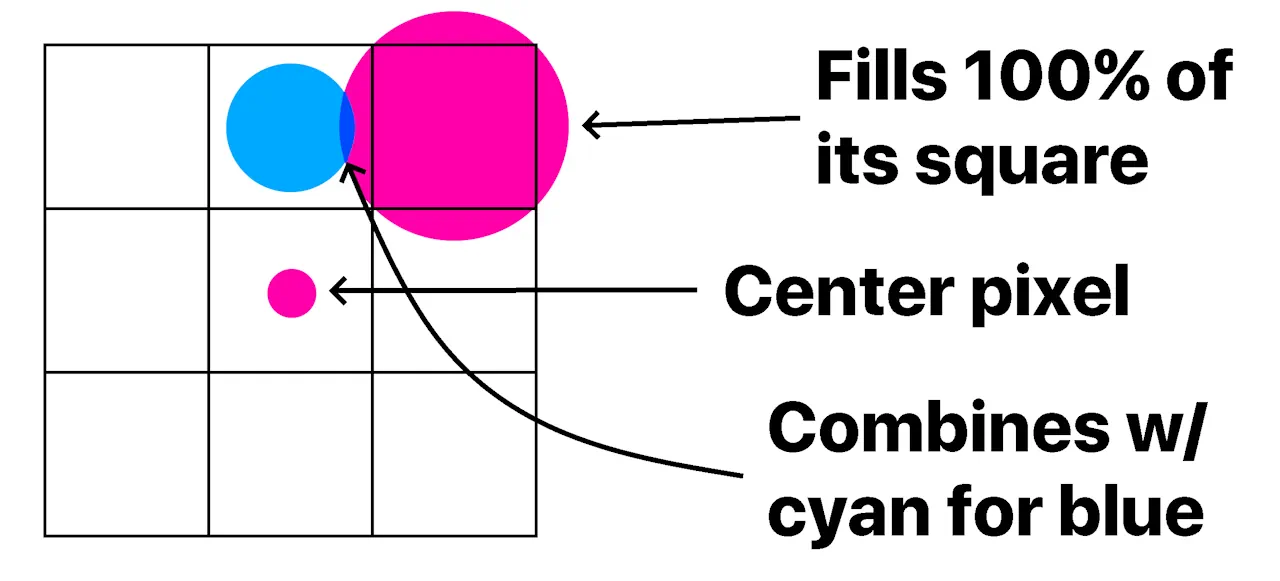
this works well on its own, but in order to get a better result, i had to blur the image first so that sharp edges weren't rendered badly. the unmodified code only samples the four corners of each square, so the average color of all the pixels in the square isn't taken into account. by blurring the image beforehand, we can save samples and still get the averaged out result when sampling only the corners. the end result is what you see at the top of your screen!
that's the end of this post. thanks for reading!
back to top ⤴